
How to use our “Request a Quote / View Quote” function
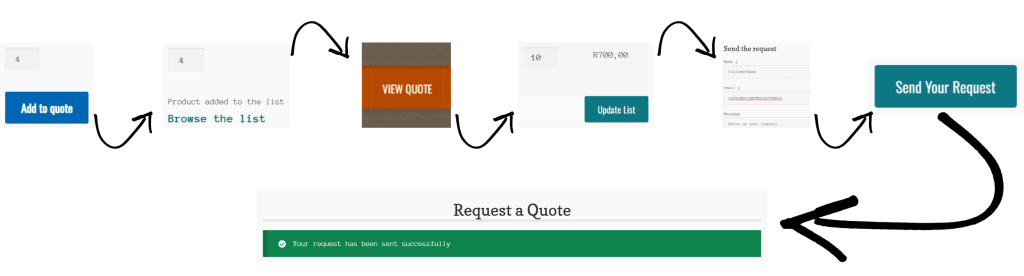
a. Selecting Products and Quantities:
- Go to the specific product page on our website using the menu or search function
- Select / specify the product quantity that you require on the product page
- Click the “Add to Quote” button
- Select as many different product items and quantities that you are interested in by following the procedure above
b. Viewing your product selections
- From the product page, click on “Browse the list” or
- From the main menu, click on “View Quote”
- On the Request a Quote page:
- make any changes to your selection (i.e. change quantities or remove a product item) – add or remove as many products as you want, before sending your request
- In the Send the Request section, enter your contact details and notes on your request (i.e. lead times, delivery options, etc.)
- Click the “Send Your Request” button
After sending your request, you quote product list will be cleared. Use the above procedures to make a new request if needed.
We will attend to you quote request within minutes via email.
Please note: For your security and privacy, we ask that you do not put your telephone number or other personal information on the quote request. If you need to speak to us directly, please use our telephone numbers on the “Contact Us” page.